YITH WooCommerce Barcodes and QR Codes Premium
YITH WooCommerce Barcodes and QR Codes allows you to generate and read barcodes and QR codes. They are automatically generated both on products
Earn 30 points back — 10% (100 pts = $1)
- 1 year of updates & new versions
- Unlimited downloads for 1 year
- Instant download after payment
- Original file · unlimited domains
We'll update it & notify you — free.
- Original file from the developer — same as the official product
- 100% clean — no malware, no backdoors
- 100% GPL licensed — use on unlimited sites
- Secure payment (card via iyzico · crypto via Cryptomus)
$2.97
1-year · +30 pts
Description
What the plugin does
Generate and apply barcodes and QR codes to your products automatically.
How you can benefit from it:
- You will generate and integrate barcodes on the products of your e-commerce automatically and quickly;
- Thanks to the barcode scan, you will improve the management of your e-commerce order statuses, stock, etc. Everything will be easier and faster;
- Get a printable list of all barcodes to create stickers for your physical products;
- Show the barcodes on the product pages;
- Allow your users to search by barcode to easily find what they are looking for;
- Integrate with Point Of Sale for quick checkout of physical products.
A barcode is an encoding tag or label that is placed on all products that allow computers, scanners and mobile devices to track and find these products much faster. Using barcodes is important in your inventory tracking process and offers countless benefits for your company and your customers. The main benefit is that barcodes eliminate the possibility of human error: the amount of errors with manually entered data is high, but scanning a barcode is fast, reliable, and by all means less time-consuming.
Another great advantage of barcodes is that you can print your barcodes (with the printer you have at home) and in a few minutes your entire inventory will be labeled and tracked. You don’t have to pay a lot, buy special printers or waste time. Easy, quick and cheap. YITH WooCommerce Barcodes and QR Codes allows you to generate and read barcodes and QR codes. They are automatically generated both on products and on orders. You can set a specific action whenever you scan a code (decrease or increase stock, change order status…) to automate and speed up your workflow without any mistakes.
Generate and apply barcodes and QR codes to orders and products
Add pre-printed codes manually or generate a code on every order and product page automatically.
Apply barcodes or QR codes
Choose the format to generate the codes and select one of the most common protocols on the market
Save time and generate barcodes for all your products with just one click
If you install the plugin and you have a catalog with hundreds of products without a barcode, you can generate the codes and apply them automatically in one click.
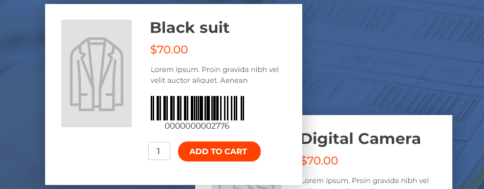
Show the barcode on the product page
Choose whether to show the barcode on the product detail page or not.
Show barcodes in order emails
Choose whether to show the barcode in the order emails that are sent to the customers or not.
Use the barcode/QR code to search for a product and manage the stock
Use the built-in shortcode to create a search page to quickly find your products. From this page, you will be able to manually increase or decrease the stock without having to access the backend and enable an advanced option to automatically edit the stock every time you scan a barcode/QR code using a code reader.
Use the barcode/QR code to search for an order and edit the status
Use the dedicated shortcode to create a page to find the orders placed in your store. From this page, you will be able to quickly edit the status of an order without having to access the backend.
Get a printable list of barcodes
Download a printable PDF file with a list of all the products in your shop. Alternatively, you can also print the same product barcode multiple times.