WooCommerce Product Configurator - Iconicwp
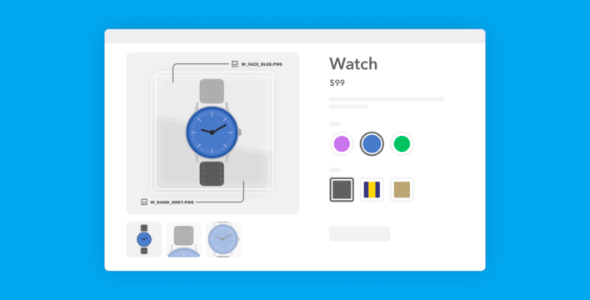
WooCommerce Product Configurator. Save Time Creating Images for Product Variations. Use image layers to create the final product image – saving you time.
Earn 30 points back — 10% (100 pts = $1)
- 1 year of updates & new versions
- Unlimited downloads for 1 year
- Instant download after payment
- Original file · unlimited domains
We'll update it & notify you — free.
- Original file from the developer — same as the official product
- 100% clean — no malware, no backdoors
- 100% GPL licensed — use on unlimited sites
- Secure payment (card via iyzico · crypto via Cryptomus)
$2.97
1-year · +30 pts
Description
WooCommerce Product Configurator
Save Time Creating Images for Product Variations
- Use image layers to create the final product image – saving you time.
- Your customers can visually configure a product in WooCommerce – show them every combination with little effort.
A Product Configurator for WooCommerce
Make Product Customization User-Friendly
- When customers select each product option, the product image will update with a new layer – giving them a much more satisfying experience.
- Once added to the cart, customers see a mini-preview of their final product with the options they selected – saving confusion and reducing cart abandonment.
PNG Image Layers
Save Time With Layered Image Layers
- Use transparent PNG image layers for each product option to save countless hours creating image combinations.
- Including an additional product option is as simple as adding a new attribute and PNG layer.
Manage Attribute Inventory
Manage Stock Levels for Each Product Option
- Manage the stock levels of each product option right from the product edit page – making inventory management a breeze.
- View stock levels quickly so you have enough of each component in stock – saving customers frustration.
Mobile Friendly
Customize WooCommerce Products On Any Device
- Allow customers to build their own products on the go so you don’t miss out on potential sales.
- Provide the best customer experience possible, no matter which device your customer is using.